
UX
SaaS
K–12 Education
Product Strategy
Title IX Reporting
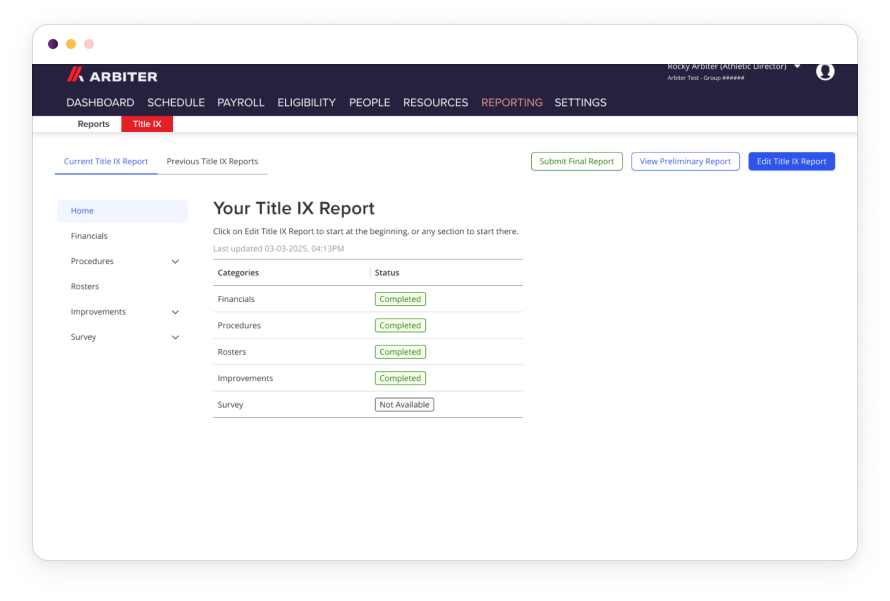
Title IX requires schools to prove they provide equal opportunities in sports and activities regardless of sex or gender — but for many athletic directors and state associations, the reporting process is massive, manual, and stressful. I led the UX design of a net-new Title IX reporting feature inside Arbiter360, building a structured, data-connected tool that generates compliance reports automatically — described by clients as "TurboTax for Title IX."
My role
Lead UX Designer
timeline
2024–2026
team
UX team, UX Manager, Engineering
tools
Figma
overview
The Challenge
Arbiter's core customer base is K–12 schools and state associations managing sports and activities. Federal and state Title IX law requires schools to submit evidence they aren't biased toward one sex or gender — but the reports are complex, vary by state, and can run extremely long. No standardized tooling existed. Schools were cobbling together spreadsheets, Word docs, and manual data entry to produce reports that Arbiter already had most of the underlying data for.
The opportunity was clear: build a Title IX reporting feature inside Arbiter360 that pulls from existing data, reduces the manual burden on schools, and makes the platform significantly more valuable to state associations.
Key project facts:
- Three distinct user groups to design for simultaneously: Schools, Auditors, and State Associations
- Multi-state scope with varying Title IX laws per state
- Hard compliance deadlines that dictated a precise, phased launch timeline
research
Understanding the users
Because Title IX requirements vary by state, we couldn't assume a one-size-fits-all approach. Research began with desk research — reviewing publicly available Title IX reports from schools and districts across multiple states to understand what the reports actually contained.
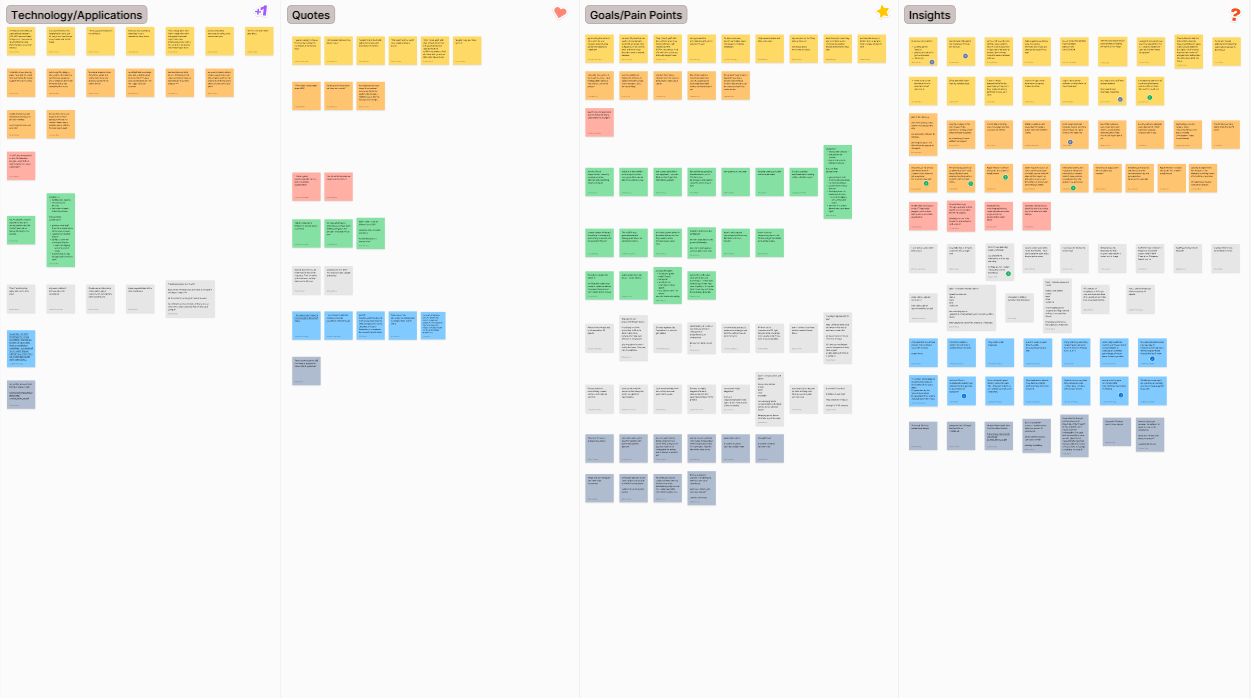
We then conducted user interviews across all three user types, building tailored question sets for each group to surface their specific goals, pain points, and current tooling. Findings were organized by goals, pain points, tech currently in use, and insights — then fed into a prioritization matrix to determine MVP scope and timeline.
1
Title IX requirements vary meaningfully by state. The product needed to be configurable, not hardcoded to one state's format
2
Athletic Directors were drowning in manual data entry. Most of the data they were re-entering already existed inside Arbiter, huge automation opportunity
3
Auditors needed visibility without edit access. A distinct auditor view was required, not a variation of the school view
4
State associations needed to manage all school submissions in one place. The state view was a separate product surface entirely, not just a dashboard
5
Compliance deadlines were fixed and immovable. The launch had to be phased, the product needed to be live before reporting season regardless of completion status
6
Reports were large and hard to navigate. Breaking the report into digestible sections with progress tracking was essential for completion rates
“Our mission to help the school as much as possible to help the teams “
Title Ix Auditor
define
Who we were designing for
Three personas to design for simultaneously:
Schools / Districts
- Title IX Coordinator and Title IX Committee
- Goal: Fill out and submit their Title IX report accurately and on time with as little manual effort as possible
- Frustration: Re-entering data that already exists elsewhere, navigating a report structure that varies by state, uncertainty about whether they've filled everything out correctly
State Associations
- Title IX Auditors and Assistant Commissioner (Title IX)
- Goal: Review and verify school submissions, manage the pipeline of reports, submit aggregated data to the State Board of Education
- Frustration: Chasing schools for submissions, no centralized view of where each school is in the process
Problem statement: How might we make Title IX reporting so structured and automated that schools spend less time on data entry and more time on compliance, while giving auditors and state associations the visibility they need to manage the process without heroics?
Design
From concepts to prototype
After the research phase and prioritization matrix, we had a clear MVP scope and a hard deadline. I led the design for the school view — the largest and most complex surface — while directing teammates to work on the auditor and state views in parallel, accounting for their other team commitments.
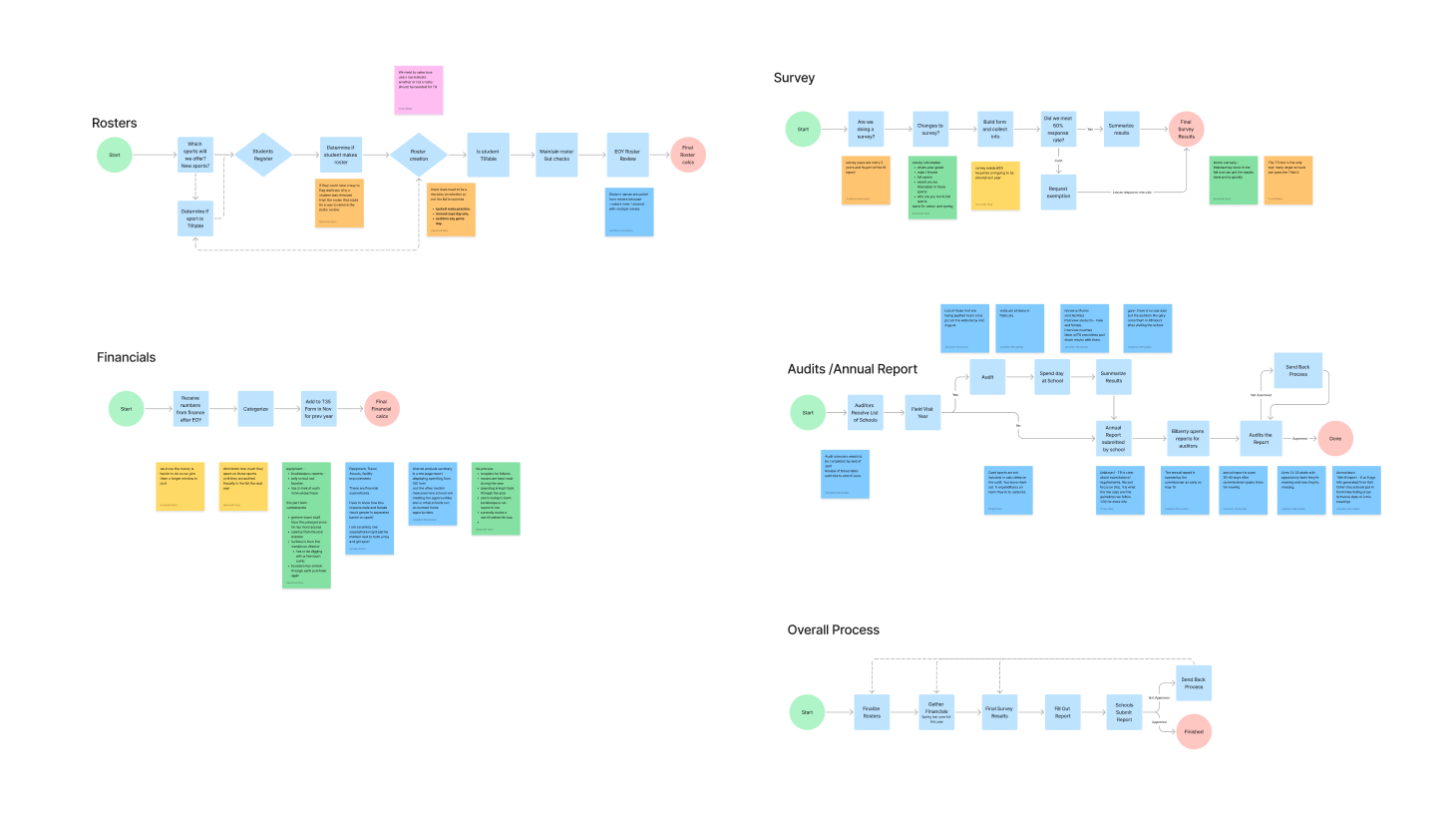
Phase 2: Designing & Prototyping
The school view was designed end-to-end by me, covering every screen, state, and edge case. Design decisions were reviewed and approved by the UX Manager before moving to testing.
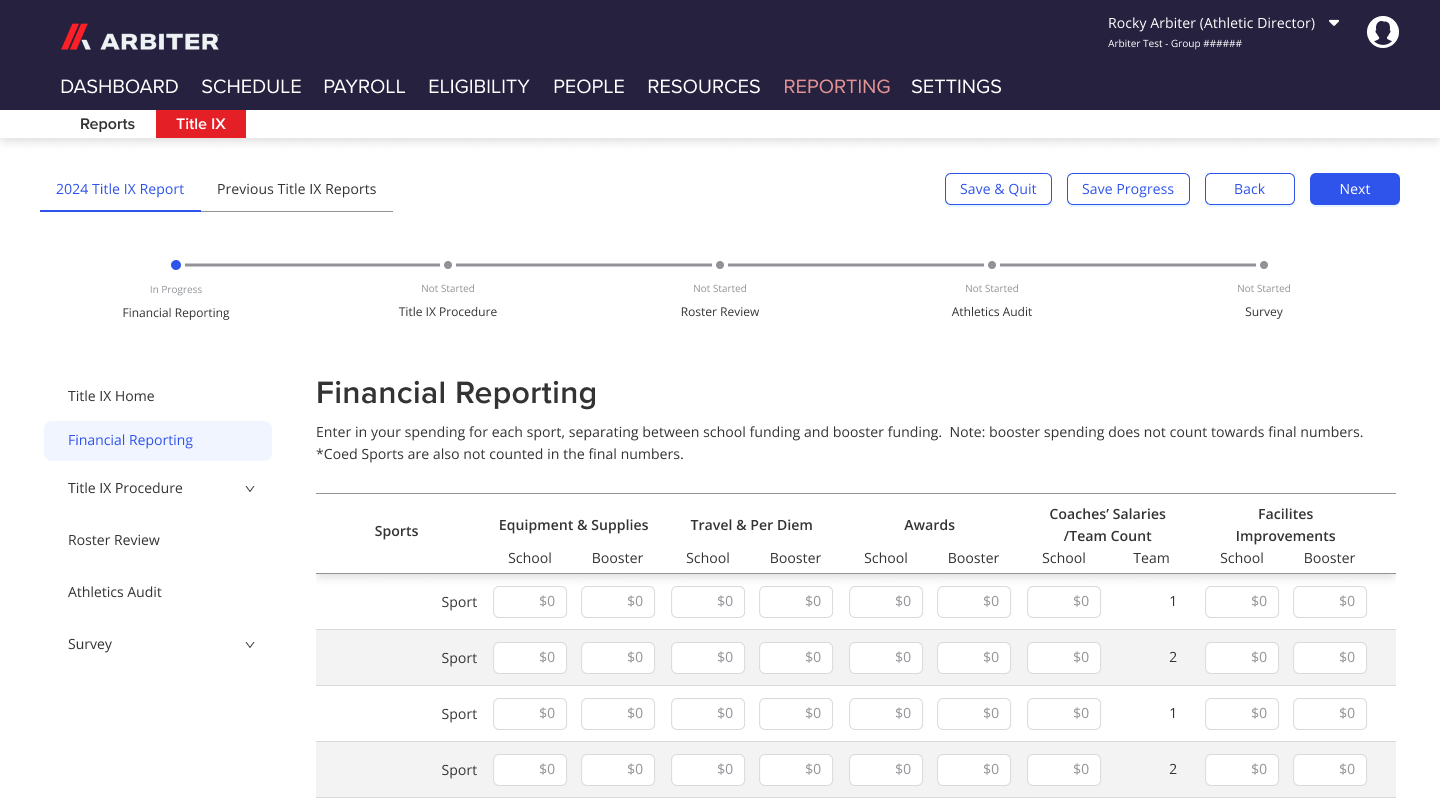
Key design decisions included:
- Breaking the report into clearly labeled sections with visible progress so Athletic Directors always knew where they were and what remained
- Surfacing pre-populated data pulled from Arbiter's existing records, so users only had to confirm or fill gaps rather than re-enter everything from scratch
- Building configurable section structures to accommodate different state requirements without a custom build per state
- Designing distinct view states for schools, auditors, and state associations — each with appropriate access levels and tailored information architecture
The auditor and state views were designed by team members I directed, with consistent patterns established from the school view as a foundation.
validate
Testing & iteration
Usability testing was conducted separately for each user group using high-fidelity prototypes. Rather than open-ended exploration, we used structured scenario-based tasks to mirror real compliance workflows:
- School users were given the task: "Fill out a Title IX report as if you were an Athletic Director," with specific sub-tasks like "fill out the financial data for the volleyball team"
- Auditor and state testing followed a similar pattern with role-appropriate scenarios
- School users were given the task: "Fill out a Title IX report as if you were an Athletic Director," with specific sub-tasks like "fill out the financial data for the volleyball team"
- Auditor and state testing followed a similar pattern with role-appropriate scenarios
After each round of testing, we made refinements. By the end of the testing cycle, changes were minimal — fine-tuning rather than structural rework — a strong signal the research and IA decisions had been sound from the start.
Before
After
No standardized structure — every school's report looked different
Schools manually compiled Title IX data from spreadsheets and documents
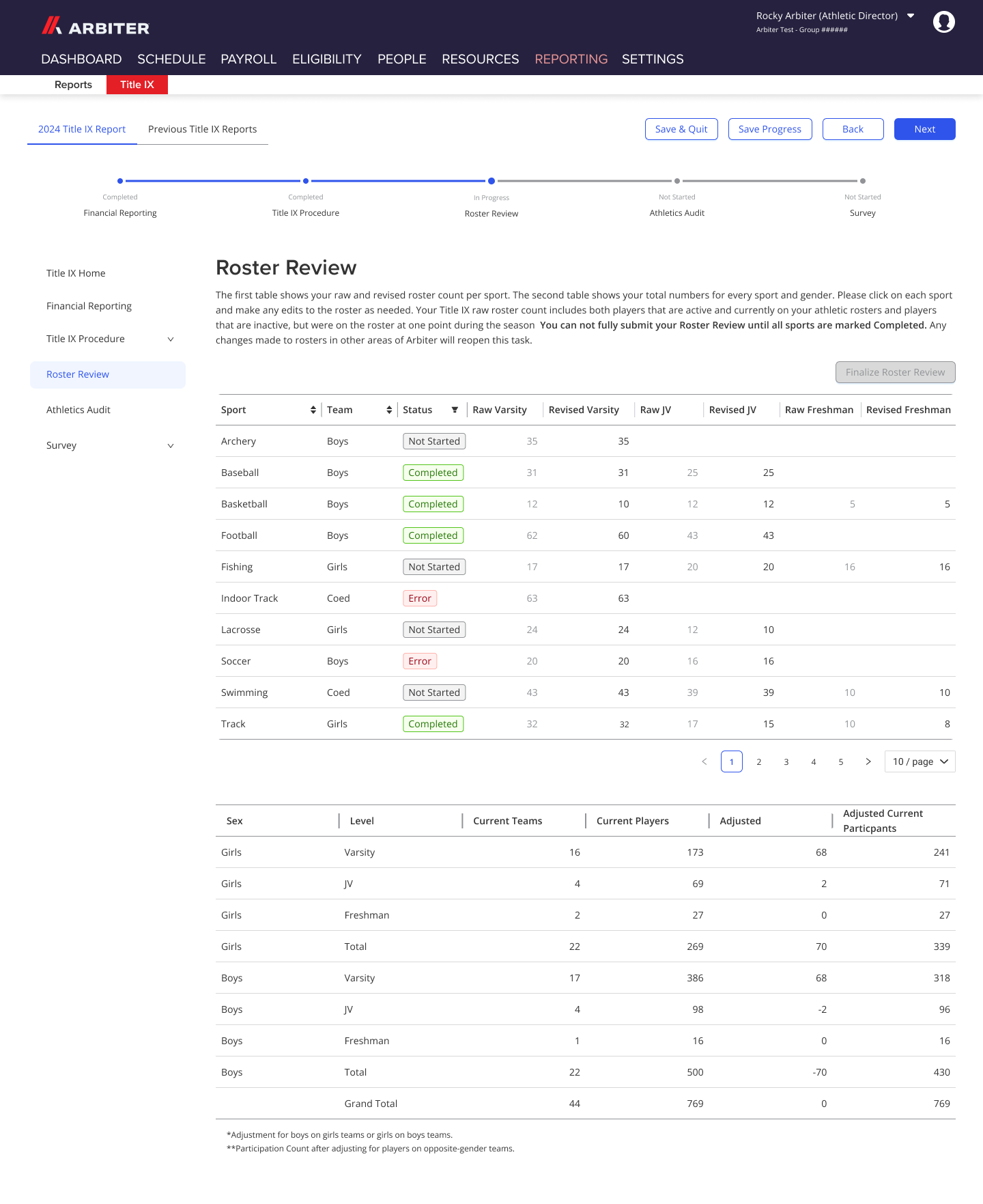
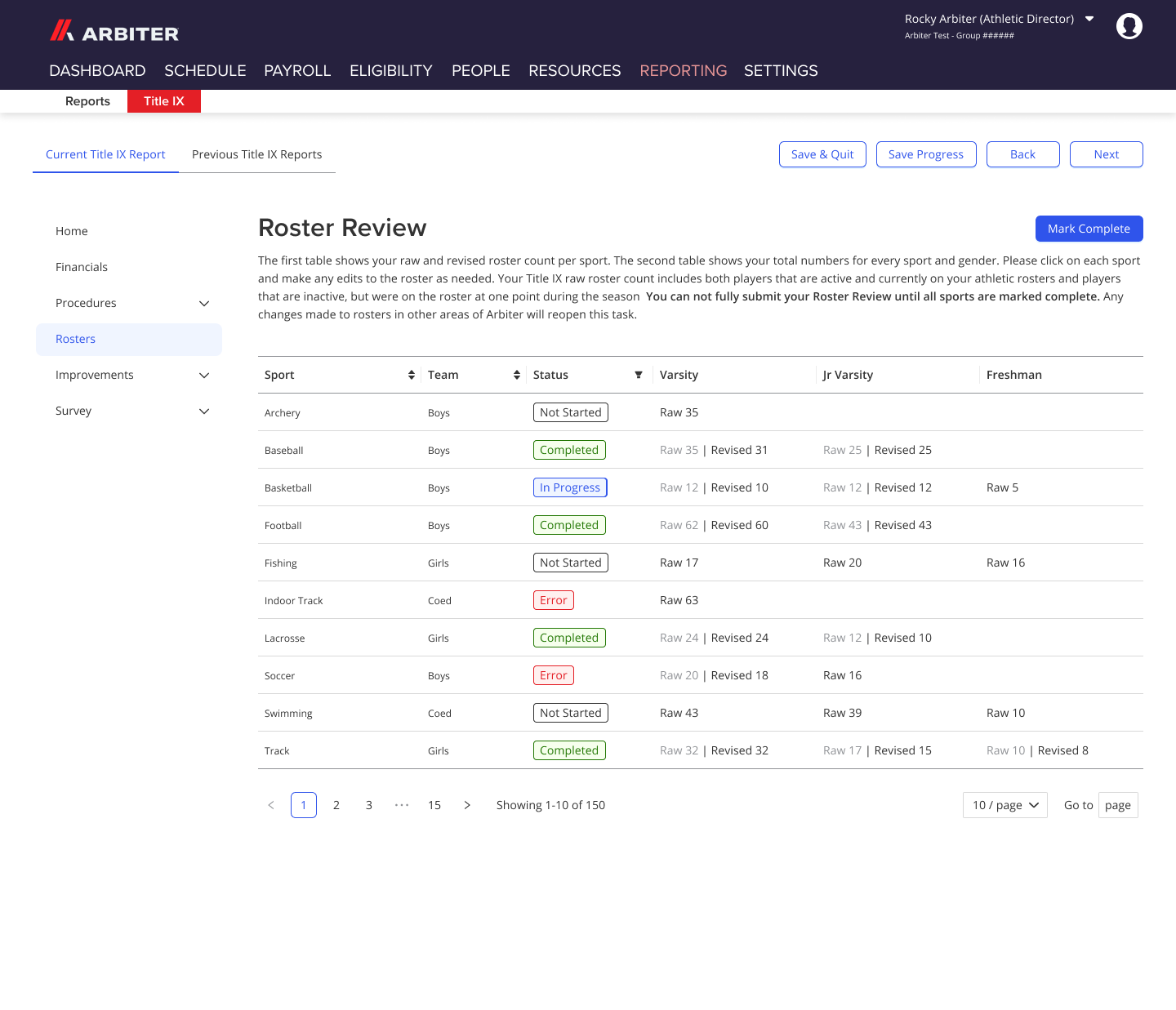
Data pulled automatically from Arbiter's existing records — schools confirm rather than re-enter
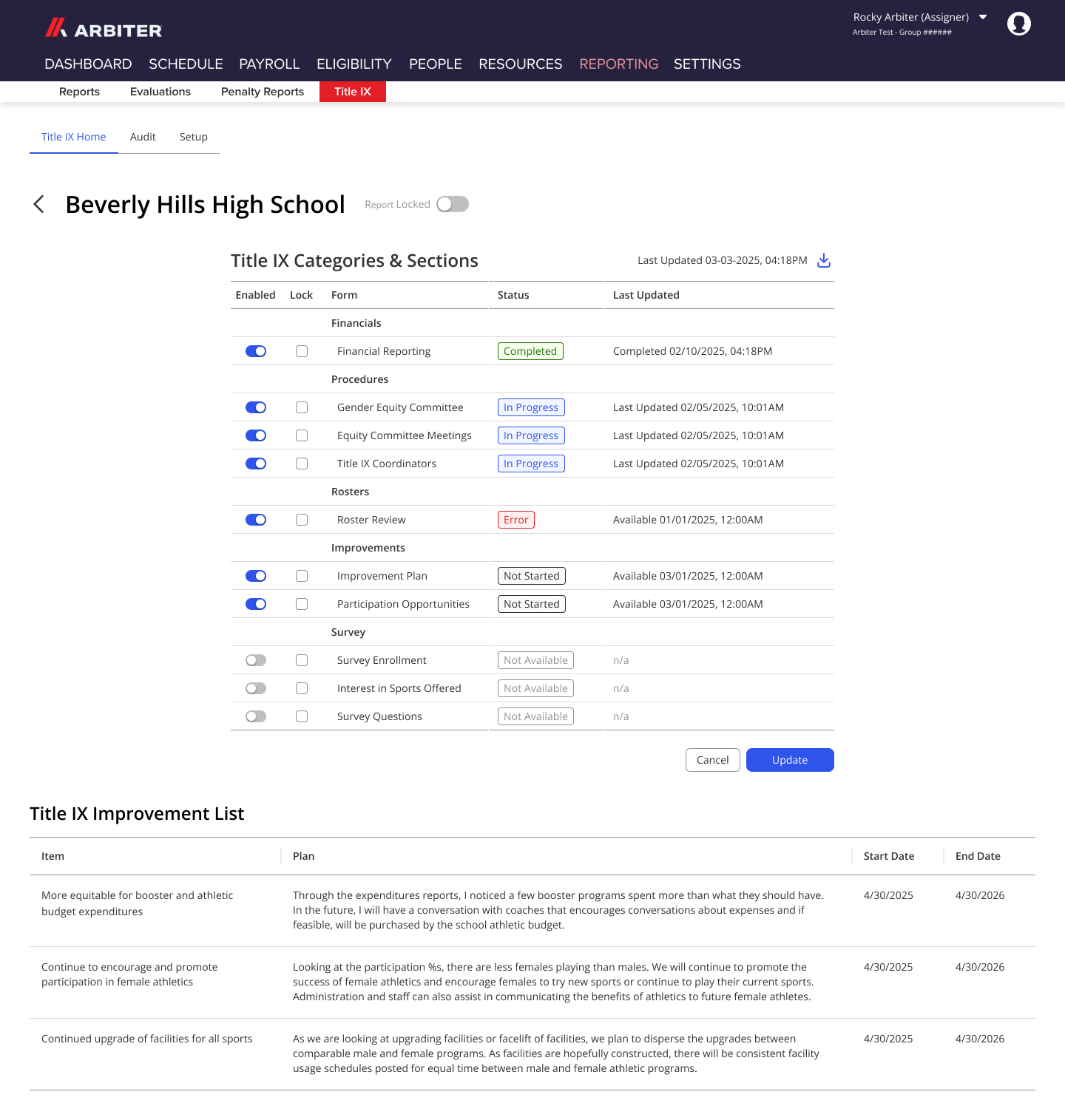
State view aggregates all school reports in one place
Guided, section-by-section report flow with progress tracking
Auditors had no centralized view of submission status
State associations managed submissions manually
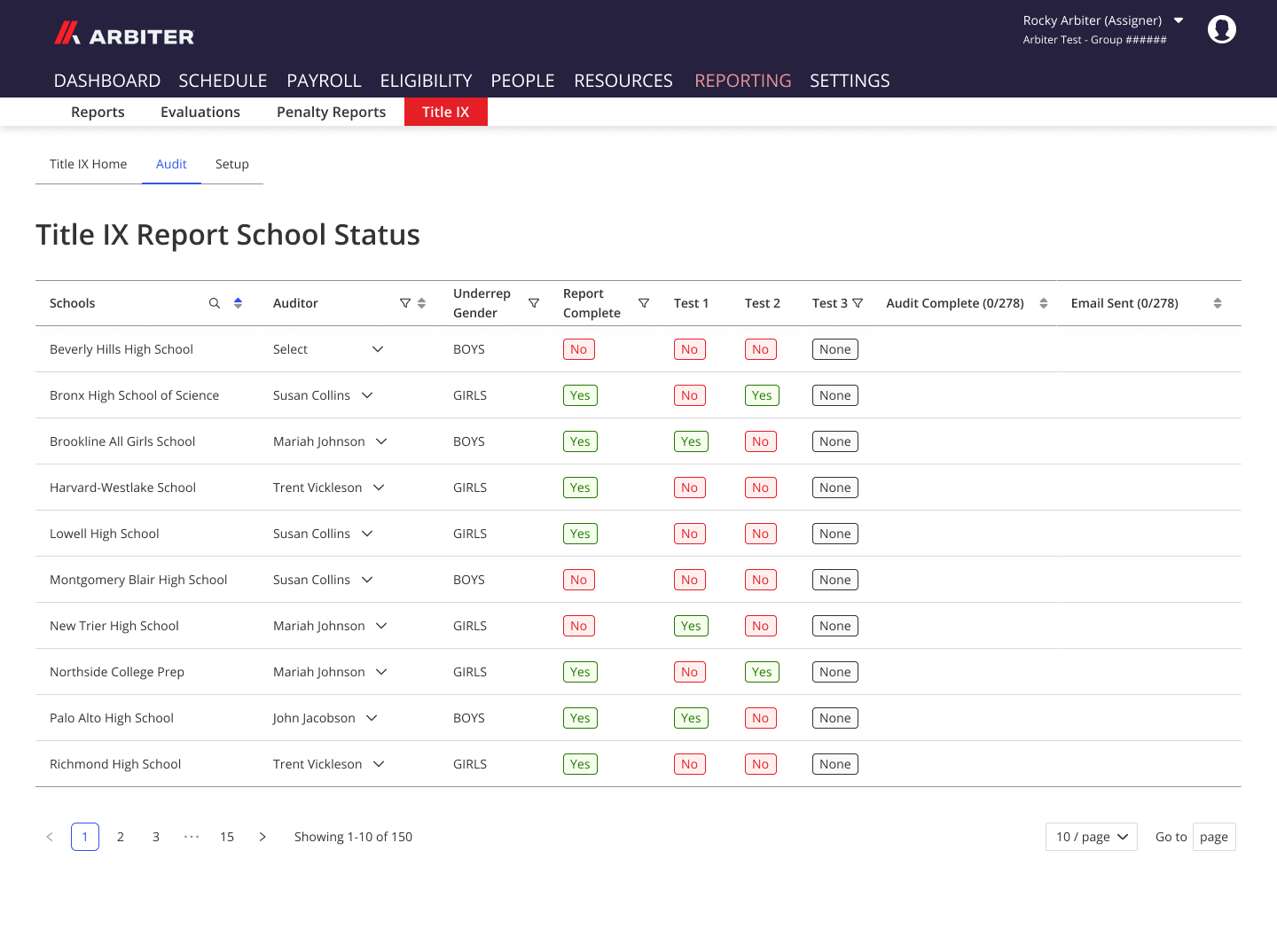
Dedicated auditor view with submission pipeline visibility
before
after
Final Design
The solution
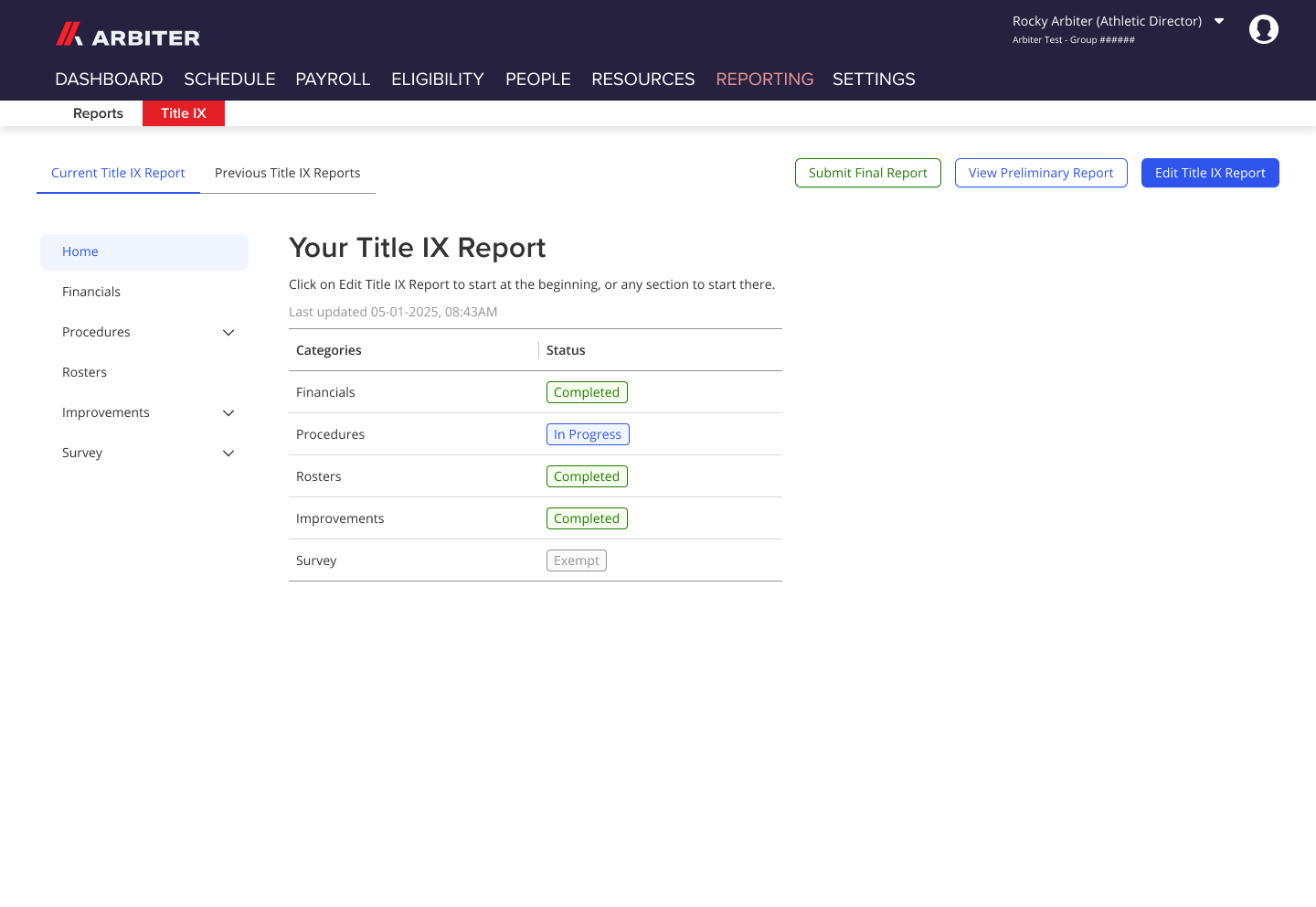
The Title IX feature shipped as three interconnected product surfaces inside Arbiter360:
School View: the core product experience. A guided, step-by-step report builder that pulls from Arbiter's existing data, prompts users to fill gaps section by section, tracks completion progress, and generates the final Title IX report automatically on submission.
Auditor View: a read-only review surface giving auditors visibility into school submissions with the ability to flag items for follow-up without being able to edit school data directly.
State Association View: a management layer showing all school submissions for a state, their completion status, and tools for the Assistant Commissioner to manage due dates and configure section names for their specific state's requirements.
The product launched in phases — the first elements went live while remaining designs were still in testing, allowing real client feedback to inform final refinements without delaying compliance-critical features past the reporting season deadline.
outcomes
Results & impact
The initial launch received immediate positive feedback from clients with zero design-related issues — only engineering bugs to resolve. That's a rare outcome for a net-new product of this complexity and a direct result of the structured research and testing process.
Client response validated the core design approach: the TurboTax comparison came unprompted from users, confirming that the guided, question-by-question structure had successfully transformed what was previously an overwhelming compliance task into a manageable workflow.
The feature meaningfully increased the value of Arbiter360 for state associations — one of the original strategic goals — by giving them a centralized tool they previously had no equivalent for.
Reflection
What I learned
The biggest challenge on this project wasn't the design itself — it was managing three simultaneous user groups with competing priorities against a hard external deadline. The prioritization matrix was essential for keeping the team aligned on what had to ship first versus what could follow.
If I were starting over, I'd push to get the state association administrators involved in research earlier. Their need for configurability — changing section names, toggling sections on/off, setting due dates — became clear late in the process. Those features are currently handled manually by developers, which is the next major upgrade for the product.
Next steps: Build self-service admin tools for state associations so they can configure their Title IX setup independently — toggling sections, setting due dates, and customizing section names — without requiring developer intervention. This was always planned as a follow-on phase and is the natural next milestone for the product.
© 2025 Savannah Nyre. All rights reserved.
Designed & built with intention.
UX
SaaS
K–12 Education
Product Strategy
Title IX Reporting
Title IX requires schools to prove they provide equal opportunities in sports and activities regardless of sex or gender — but for many athletic directors and state associations, the reporting process is massive, manual, and stressful. I led the UX design of a net-new Title IX reporting feature inside Arbiter360, building a structured, data-connected tool that generates compliance reports automatically — described by clients as "TurboTax for Title IX."
My role
Lead UX Designer
timeline
2024–2026
team
UX team, UX Manager, Engineering
tools
Figma
overview
The Challenge
Arbiter's core customer base is K–12 schools and state associations managing sports and activities. Federal and state Title IX law requires schools to submit evidence they aren't biased toward one sex or gender — but the reports are complex, vary by state, and can run extremely long. No standardized tooling existed. Schools were cobbling together spreadsheets, Word docs, and manual data entry to produce reports that Arbiter already had most of the underlying data for.
The opportunity was clear: build a Title IX reporting feature inside Arbiter360 that pulls from existing data, reduces the manual burden on schools, and makes the platform significantly more valuable to state associations.
Key project facts:
- Three distinct user groups to design for simultaneously: Schools, Auditors, and State Associations
- Multi-state scope with varying Title IX laws per state
- Hard compliance deadlines that dictated a precise, phased launch timeline
research
Understanding the users
Because Title IX requirements vary by state, we couldn't assume a one-size-fits-all approach. Research began with desk research — reviewing publicly available Title IX reports from schools and districts across multiple states to understand what the reports actually contained.
We then conducted user interviews across all three user types, building tailored question sets for each group to surface their specific goals, pain points, and current tooling. Findings were organized by goals, pain points, tech currently in use, and insights — then fed into a prioritization matrix to determine MVP scope and timeline.
1
Title IX requirements vary meaningfully by state. The product needed to be configurable, not hardcoded to one state's format
2
Athletic Directors were drowning in manual data entry. Most of the data they were re-entering already existed inside Arbiter, huge automation opportunity
3
Auditors needed visibility without edit access. A distinct auditor view was required, not a variation of the school view
4
State associations needed to manage all school submissions in one place. The state view was a separate product surface entirely, not just a dashboard
5
Compliance deadlines were fixed and immovable. The launch had to be phased, the product needed to be live before reporting season regardless of completion status
6
Reports were large and hard to navigate. Breaking the report into digestible sections with progress tracking was essential for completion rates
“Our mission to help the school as much as possible to help the teams “
Title Ix Auditor
define
Who we were designing for
Three personas to design for simultaneously:
Schools / Districts
- Title IX Coordinator and Title IX Committee
- Goal: Fill out and submit their Title IX report accurately and on time with as little manual effort as possible
- Frustration: Re-entering data that already exists elsewhere, navigating a report structure that varies by state, uncertainty about whether they've filled everything out correctly
State Associations
- Title IX Auditors and Assistant Commissioner (Title IX)
- Goal: Review and verify school submissions, manage the pipeline of reports, submit aggregated data to the State Board of Education
- Frustration: Chasing schools for submissions, no centralized view of where each school is in the process
Problem statement: How might we make Title IX reporting so structured and automated that schools spend less time on data entry and more time on compliance, while giving auditors and state associations the visibility they need to manage the process without heroics?
Design
From concepts to prototype
After the research phase and prioritization matrix, we had a clear MVP scope and a hard deadline. I led the design for the school view — the largest and most complex surface — while directing teammates to work on the auditor and state views in parallel, accounting for their other team commitments.
Phase 2: Designing & Prototyping
The school view was designed end-to-end by me, covering every screen, state, and edge case. Design decisions were reviewed and approved by the UX Manager before moving to testing.
Key design decisions included:
- Breaking the report into clearly labeled sections with visible progress so Athletic Directors always knew where they were and what remained
- Surfacing pre-populated data pulled from Arbiter's existing records, so users only had to confirm or fill gaps rather than re-enter everything from scratch
- Building configurable section structures to accommodate different state requirements without a custom build per state
- Designing distinct view states for schools, auditors, and state associations — each with appropriate access levels and tailored information architecture
The auditor and state views were designed by team members I directed, with consistent patterns established from the school view as a foundation.
validate
Testing & iteration
Usability testing was conducted separately for each user group using high-fidelity prototypes. Rather than open-ended exploration, we used structured scenario-based tasks to mirror real compliance workflows:
- School users were given the task: "Fill out a Title IX report as if you were an Athletic Director," with specific sub-tasks like "fill out the financial data for the volleyball team"
- Auditor and state testing followed a similar pattern with role-appropriate scenarios
- School users were given the task: "Fill out a Title IX report as if you were an Athletic Director," with specific sub-tasks like "fill out the financial data for the volleyball team"
- Auditor and state testing followed a similar pattern with role-appropriate scenarios
After each round of testing, we made refinements. By the end of the testing cycle, changes were minimal — fine-tuning rather than structural rework — a strong signal the research and IA decisions had been sound from the start.
Before
After
No standardized structure — every school's report looked different
Schools manually compiled Title IX data from spreadsheets and documents
Data pulled automatically from Arbiter's existing records — schools confirm rather than re-enter
State view aggregates all school reports in one place
Guided, section-by-section report flow with progress tracking
Auditors had no centralized view of submission status
State associations managed submissions manually
Dedicated auditor view with submission pipeline visibility
before
after
Final Design
The solution
The Title IX feature shipped as three interconnected product surfaces inside Arbiter360:
School View: the core product experience. A guided, step-by-step report builder that pulls from Arbiter's existing data, prompts users to fill gaps section by section, tracks completion progress, and generates the final Title IX report automatically on submission.
Auditor View: a read-only review surface giving auditors visibility into school submissions with the ability to flag items for follow-up without being able to edit school data directly.
State Association View: a management layer showing all school submissions for a state, their completion status, and tools for the Assistant Commissioner to manage due dates and configure section names for their specific state's requirements.
The product launched in phases — the first elements went live while remaining designs were still in testing, allowing real client feedback to inform final refinements without delaying compliance-critical features past the reporting season deadline.
outcomes
Results & impact
The initial launch received immediate positive feedback from clients with zero design-related issues — only engineering bugs to resolve. That's a rare outcome for a net-new product of this complexity and a direct result of the structured research and testing process.
Client response validated the core design approach: the TurboTax comparison came unprompted from users, confirming that the guided, question-by-question structure had successfully transformed what was previously an overwhelming compliance task into a manageable workflow.
The feature meaningfully increased the value of Arbiter360 for state associations — one of the original strategic goals — by giving them a centralized tool they previously had no equivalent for.
Reflection
What I learned
The biggest challenge on this project wasn't the design itself — it was managing three simultaneous user groups with competing priorities against a hard external deadline. The prioritization matrix was essential for keeping the team aligned on what had to ship first versus what could follow.
If I were starting over, I'd push to get the state association administrators involved in research earlier. Their need for configurability — changing section names, toggling sections on/off, setting due dates — became clear late in the process. Those features are currently handled manually by developers, which is the next major upgrade for the product.
Next steps: Build self-service admin tools for state associations so they can configure their Title IX setup independently — toggling sections, setting due dates, and customizing section names — without requiring developer intervention. This was always planned as a follow-on phase and is the natural next milestone for the product.
© 2025 Savannah Nyre. All rights reserved.
Designed & built with intention.

UX
SaaS
K–12 Education
Product Strategy
Title IX Reporting
Title IX requires schools to prove they provide equal opportunities in sports and activities regardless of sex or gender — but for many athletic directors and state associations, the reporting process is massive, manual, and stressful. I led the UX design of a net-new Title IX reporting feature inside Arbiter360, building a structured, data-connected tool that generates compliance reports automatically — described by clients as "TurboTax for Title IX."
My role
Lead UX Designer
timeline
2024–2026
team
UX team, UX Manager, Engineering
tools
Figma
overview
The Challenge
Arbiter's core customer base is K–12 schools and state associations managing sports and activities. Federal and state Title IX law requires schools to submit evidence they aren't biased toward one sex or gender — but the reports are complex, vary by state, and can run extremely long. No standardized tooling existed. Schools were cobbling together spreadsheets, Word docs, and manual data entry to produce reports that Arbiter already had most of the underlying data for.
The opportunity was clear: build a Title IX reporting feature inside Arbiter360 that pulls from existing data, reduces the manual burden on schools, and makes the platform significantly more valuable to state associations.
Key project facts:
- Three distinct user groups to design for simultaneously: Schools, Auditors, and State Associations
- Multi-state scope with varying Title IX laws per state
- Hard compliance deadlines that dictated a precise, phased launch timeline
research
Understanding the users
Because Title IX requirements vary by state, we couldn't assume a one-size-fits-all approach. Research began with desk research — reviewing publicly available Title IX reports from schools and districts across multiple states to understand what the reports actually contained.
We then conducted user interviews across all three user types, building tailored question sets for each group to surface their specific goals, pain points, and current tooling. Findings were organized by goals, pain points, tech currently in use, and insights — then fed into a prioritization matrix to determine MVP scope and timeline.
1
Title IX requirements vary meaningfully by state. The product needed to be configurable, not hardcoded to one state's format
2
Athletic Directors were drowning in manual data entry. Most of the data they were re-entering already existed inside Arbiter, huge automation opportunity
3
Auditors needed visibility without edit access. A distinct auditor view was required, not a variation of the school view
4
State associations needed to manage all school submissions in one place. The state view was a separate product surface entirely, not just a dashboard
5
Compliance deadlines were fixed and immovable. The launch had to be phased, the product needed to be live before reporting season regardless of completion status
6
Reports were large and hard to navigate. Breaking the report into digestible sections with progress tracking was essential for completion rates
“Our mission to help the school as much as possible to help the teams “
Title Ix Auditor
define
Who we were designing for
Three personas to design for simultaneously:
Schools / Districts
- Title IX Coordinator and Title IX Committee
- Goal: Fill out and submit their Title IX report accurately and on time with as little manual effort as possible
- Frustration: Re-entering data that already exists elsewhere, navigating a report structure that varies by state, uncertainty about whether they've filled everything out correctly
State Associations
- Title IX Auditors and Assistant Commissioner (Title IX)
- Goal: Review and verify school submissions, manage the pipeline of reports, submit aggregated data to the State Board of Education
- Frustration: Chasing schools for submissions, no centralized view of where each school is in the process
Problem statement: How might we make Title IX reporting so structured and automated that schools spend less time on data entry and more time on compliance, while giving auditors and state associations the visibility they need to manage the process without heroics?
Design
From concepts to prototype
After the research phase and prioritization matrix, we had a clear MVP scope and a hard deadline. I led the design for the school view — the largest and most complex surface — while directing teammates to work on the auditor and state views in parallel, accounting for their other team commitments.
Phase 2: Designing & Prototyping
The school view was designed end-to-end by me, covering every screen, state, and edge case. Design decisions were reviewed and approved by the UX Manager before moving to testing.
Key design decisions included:
- Breaking the report into clearly labeled sections with visible progress so Athletic Directors always knew where they were and what remained
- Surfacing pre-populated data pulled from Arbiter's existing records, so users only had to confirm or fill gaps rather than re-enter everything from scratch
- Building configurable section structures to accommodate different state requirements without a custom build per state
- Designing distinct view states for schools, auditors, and state associations — each with appropriate access levels and tailored information architecture
The auditor and state views were designed by team members I directed, with consistent patterns established from the school view as a foundation.
validate
Testing & iteration
Usability testing was conducted separately for each user group using high-fidelity prototypes. Rather than open-ended exploration, we used structured scenario-based tasks to mirror real compliance workflows:
- School users were given the task: "Fill out a Title IX report as if you were an Athletic Director," with specific sub-tasks like "fill out the financial data for the volleyball team"
- Auditor and state testing followed a similar pattern with role-appropriate scenarios
After each round of testing, we made refinements. By the end of the testing cycle, changes were minimal — fine-tuning rather than structural rework — a strong signal the research and IA decisions had been sound from the start.
Before
After
No standardized structure — every school's report looked different
Schools manually compiled Title IX data from spreadsheets and documents
Data pulled automatically from Arbiter's existing records — schools confirm rather than re-enter
State view aggregates all school reports in one place
Guided, section-by-section report flow with progress tracking
Auditors had no centralized view of submission status
State associations managed submissions manually
Dedicated auditor view with submission pipeline visibility
before
after
Final Design
The solution
The Title IX feature shipped as three interconnected product surfaces inside Arbiter360:
School View: the core product experience. A guided, step-by-step report builder that pulls from Arbiter's existing data, prompts users to fill gaps section by section, tracks completion progress, and generates the final Title IX report automatically on submission.
Auditor View: a read-only review surface giving auditors visibility into school submissions with the ability to flag items for follow-up without being able to edit school data directly.
State Association View: a management layer showing all school submissions for a state, their completion status, and tools for the Assistant Commissioner to manage due dates and configure section names for their specific state's requirements.
The product launched in phases — the first elements went live while remaining designs were still in testing, allowing real client feedback to inform final refinements without delaying compliance-critical features past the reporting season deadline.
outcomes
Results & impact
The initial launch received immediate positive feedback from clients with zero design-related issues — only engineering bugs to resolve. That's a rare outcome for a net-new product of this complexity and a direct result of the structured research and testing process.
Client response validated the core design approach: the TurboTax comparison came unprompted from users, confirming that the guided, question-by-question structure had successfully transformed what was previously an overwhelming compliance task into a manageable workflow.
The feature meaningfully increased the value of Arbiter360 for state associations — one of the original strategic goals — by giving them a centralized tool they previously had no equivalent for.
Reflection
What I learned
The biggest challenge on this project wasn't the design itself — it was managing three simultaneous user groups with competing priorities against a hard external deadline. The prioritization matrix was essential for keeping the team aligned on what had to ship first versus what could follow.
If I were starting over, I'd push to get the state association administrators involved in research earlier. Their need for configurability — changing section names, toggling sections on/off, setting due dates — became clear late in the process. Those features are currently handled manually by developers, which is the next major upgrade for the product.
Next steps: Build self-service admin tools for state associations so they can configure their Title IX setup independently — toggling sections, setting due dates, and customizing section names — without requiring developer intervention. This was always planned as a follow-on phase and is the natural next milestone for the product.
© 2025 Savannah Nyre. All rights reserved.
Designed & built with intention.
UX
SaaS
K–12 Education
Product Strategy
Title IX Reporting
Title IX requires schools to prove they provide equal opportunities in sports and activities regardless of sex or gender — but for many athletic directors and state associations, the reporting process is massive, manual, and stressful. I led the UX design of a net-new Title IX reporting feature inside Arbiter360, building a structured, data-connected tool that generates compliance reports automatically — described by clients as "TurboTax for Title IX."
My role
Lead UX Designer
timeline
2024–2026
team
UX team, UX Manager, Engineering
tools
Figma
overview
The Challenge
Arbiter's core customer base is K–12 schools and state associations managing sports and activities. Federal and state Title IX law requires schools to submit evidence they aren't biased toward one sex or gender — but the reports are complex, vary by state, and can run extremely long. No standardized tooling existed. Schools were cobbling together spreadsheets, Word docs, and manual data entry to produce reports that Arbiter already had most of the underlying data for.
The opportunity was clear: build a Title IX reporting feature inside Arbiter360 that pulls from existing data, reduces the manual burden on schools, and makes the platform significantly more valuable to state associations.
Key project facts:
- Three distinct user groups to design for simultaneously: Schools, Auditors, and State Associations
- Multi-state scope with varying Title IX laws per state
- Hard compliance deadlines that dictated a precise, phased launch timeline
research
Understanding the users
Because Title IX requirements vary by state, we couldn't assume a one-size-fits-all approach. Research began with desk research — reviewing publicly available Title IX reports from schools and districts across multiple states to understand what the reports actually contained.
We then conducted user interviews across all three user types, building tailored question sets for each group to surface their specific goals, pain points, and current tooling. Findings were organized by goals, pain points, tech currently in use, and insights — then fed into a prioritization matrix to determine MVP scope and timeline.
1
Title IX requirements vary meaningfully by state. The product needed to be configurable, not hardcoded to one state's format
2
Athletic Directors were drowning in manual data entry. Most of the data they were re-entering already existed inside Arbiter, huge automation opportunity
3
Auditors needed visibility without edit access. A distinct auditor view was required, not a variation of the school view
4
State associations needed to manage all school submissions in one place. The state view was a separate product surface entirely, not just a dashboard
5
Compliance deadlines were fixed and immovable. The launch had to be phased, the product needed to be live before reporting season regardless of completion status
6
Reports were large and hard to navigate. Breaking the report into digestible sections with progress tracking was essential for completion rates
“Our mission to help the school as much as possible to help the teams “
Title Ix Auditor
define
Who we were designing for
Three personas to design for simultaneously:
Schools / Districts
- Title IX Coordinator and Title IX Committee
- Goal: Fill out and submit their Title IX report accurately and on time with as little manual effort as possible
- Frustration: Re-entering data that already exists elsewhere, navigating a report structure that varies by state, uncertainty about whether they've filled everything out correctly
State Associations
- Title IX Auditors and Assistant Commissioner (Title IX)
- Goal: Review and verify school submissions, manage the pipeline of reports, submit aggregated data to the State Board of Education
- Frustration: Chasing schools for submissions, no centralized view of where each school is in the process
Problem statement: How might we make Title IX reporting so structured and automated that schools spend less time on data entry and more time on compliance, while giving auditors and state associations the visibility they need to manage the process without heroics?
Design
From concepts to prototype
After the research phase and prioritization matrix, we had a clear MVP scope and a hard deadline. I led the design for the school view — the largest and most complex surface — while directing teammates to work on the auditor and state views in parallel, accounting for their other team commitments.
Phase 2: Designing & Prototyping
The school view was designed end-to-end by me, covering every screen, state, and edge case. Design decisions were reviewed and approved by the UX Manager before moving to testing.
Key design decisions included:
- Breaking the report into clearly labeled sections with visible progress so Athletic Directors always knew where they were and what remained
- Surfacing pre-populated data pulled from Arbiter's existing records, so users only had to confirm or fill gaps rather than re-enter everything from scratch
- Building configurable section structures to accommodate different state requirements without a custom build per state
- Designing distinct view states for schools, auditors, and state associations — each with appropriate access levels and tailored information architecture
The auditor and state views were designed by team members I directed, with consistent patterns established from the school view as a foundation.
validate
Testing & iteration
Usability testing was conducted separately for each user group using high-fidelity prototypes. Rather than open-ended exploration, we used structured scenario-based tasks to mirror real compliance workflows:
- School users were given the task: "Fill out a Title IX report as if you were an Athletic Director," with specific sub-tasks like "fill out the financial data for the volleyball team"
- Auditor and state testing followed a similar pattern with role-appropriate scenarios
- School users were given the task: "Fill out a Title IX report as if you were an Athletic Director," with specific sub-tasks like "fill out the financial data for the volleyball team"
- Auditor and state testing followed a similar pattern with role-appropriate scenarios
After each round of testing, we made refinements. By the end of the testing cycle, changes were minimal — fine-tuning rather than structural rework — a strong signal the research and IA decisions had been sound from the start.
Before
After
No standardized structure — every school's report looked different
Schools manually compiled Title IX data from spreadsheets and documents
Data pulled automatically from Arbiter's existing records — schools confirm rather than re-enter
State view aggregates all school reports in one place
Guided, section-by-section report flow with progress tracking
Auditors had no centralized view of submission status
State associations managed submissions manually
Dedicated auditor view with submission pipeline visibility
before
after
Final Design
The solution
The Title IX feature shipped as three interconnected product surfaces inside Arbiter360:
School View: the core product experience. A guided, step-by-step report builder that pulls from Arbiter's existing data, prompts users to fill gaps section by section, tracks completion progress, and generates the final Title IX report automatically on submission.
Auditor View: a read-only review surface giving auditors visibility into school submissions with the ability to flag items for follow-up without being able to edit school data directly.
State Association View: a management layer showing all school submissions for a state, their completion status, and tools for the Assistant Commissioner to manage due dates and configure section names for their specific state's requirements.
The product launched in phases — the first elements went live while remaining designs were still in testing, allowing real client feedback to inform final refinements without delaying compliance-critical features past the reporting season deadline.
outcomes
Results & impact
The initial launch received immediate positive feedback from clients with zero design-related issues — only engineering bugs to resolve. That's a rare outcome for a net-new product of this complexity and a direct result of the structured research and testing process.
Client response validated the core design approach: the TurboTax comparison came unprompted from users, confirming that the guided, question-by-question structure had successfully transformed what was previously an overwhelming compliance task into a manageable workflow.
The feature meaningfully increased the value of Arbiter360 for state associations — one of the original strategic goals — by giving them a centralized tool they previously had no equivalent for.
Reflection
What I learned
The biggest challenge on this project wasn't the design itself — it was managing three simultaneous user groups with competing priorities against a hard external deadline. The prioritization matrix was essential for keeping the team aligned on what had to ship first versus what could follow.
If I were starting over, I'd push to get the state association administrators involved in research earlier. Their need for configurability — changing section names, toggling sections on/off, setting due dates — became clear late in the process. Those features are currently handled manually by developers, which is the next major upgrade for the product.
Next steps: Build self-service admin tools for state associations so they can configure their Title IX setup independently — toggling sections, setting due dates, and customizing section names — without requiring developer intervention. This was always planned as a follow-on phase and is the natural next milestone for the product.
© 2025 Savannah Nyre. All rights reserved.
Designed & built with intention.