
UI Redesign: Utah DLD

Hypothetically, the dMV is great!
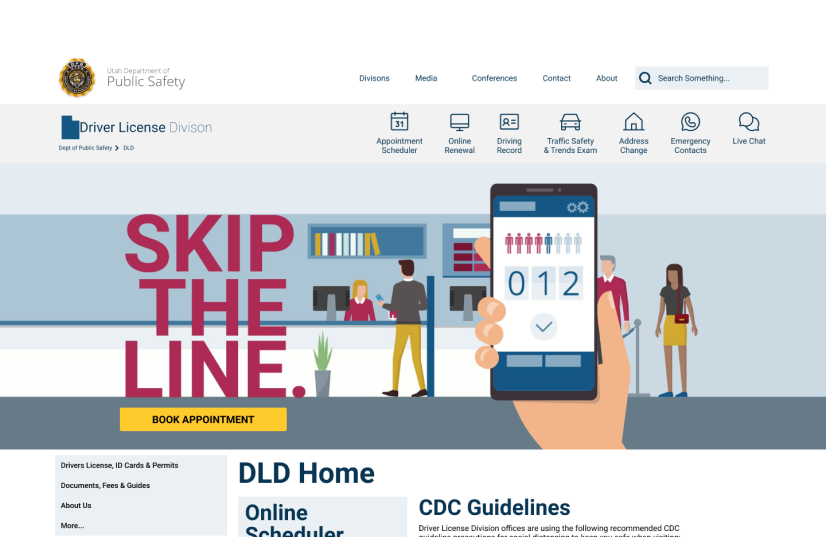
Everyone hates going to the DMV, let’s not make everyone mad by having to just go online to their site too! Redesigning these sites can be hard, but we believe we solved a lot of their issues. Now people won’t have to struggle before going to the DMV.
Scope
Qualitative user research, sitemapping,
Tools
Figma, Maze.co,
Timeline
2 months
Goverment websites need help
The Utah’s Drivers License Division has a website for users to go on and get information or change information for their own licenses. Most government websites don’t have the prettiest, or usable, user interface. This website is no different. It is not the worst site design we have seen but it definitely has some flaws.

Goals
- Understand the current website structure.
- Are there things we can condense and group together?
- Do some categories have higher importance than others? Are they structured as such?
- Understand our users?
- What are common uses with the site?
- What do the users plan to do on the site?
- Create a better expierence for renewing your drivers license.
Method
- Phase 1: User Analysis
- Phase 2: Information Architecture
- Phase 3: Prototyping
- Phase 4: Interaction Design
- Phase 5: User Testing
Phase 1: User Interface Analysis
methodology
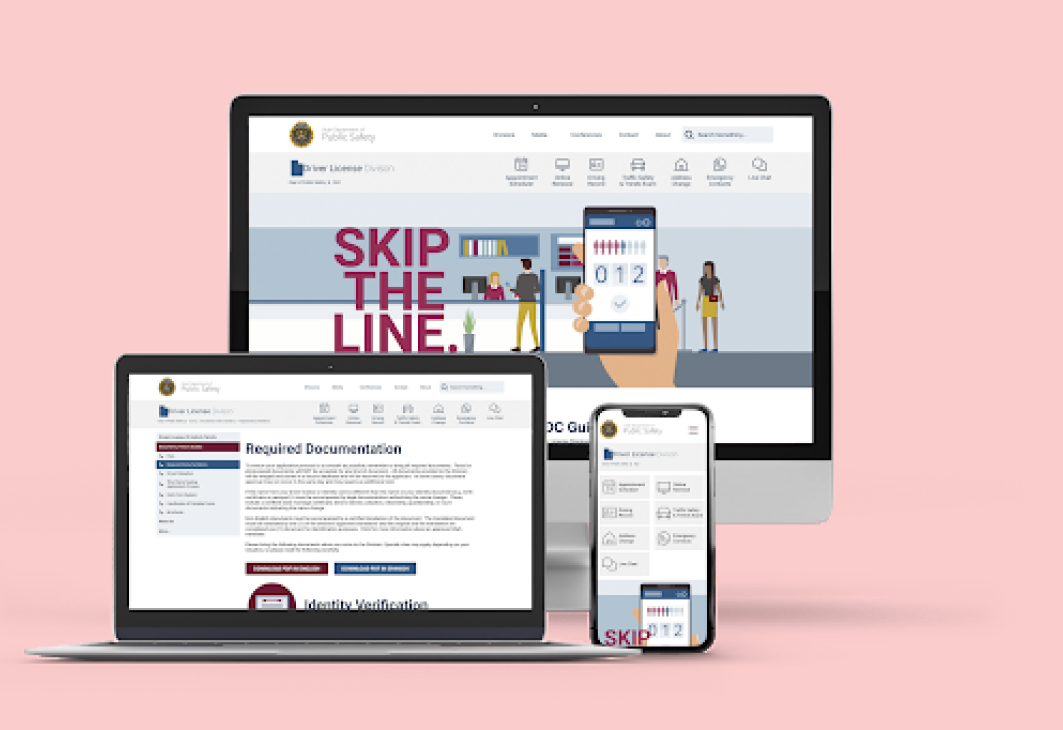
In this project we wanted to interview five different people who would want to be able to look online to find what kind of documentation they would need to renew their driver’s licenses. Since this is a fairly standard procedure for just about everyone, we wanted to have a mixture of people that would have different types of ID documentation to bring in. ie citizens and non citizens. We wanted to analyze how easy it would be for everyone to find what they were looking for and make sure they were ready to go while heading into the DMV.
proto-persona
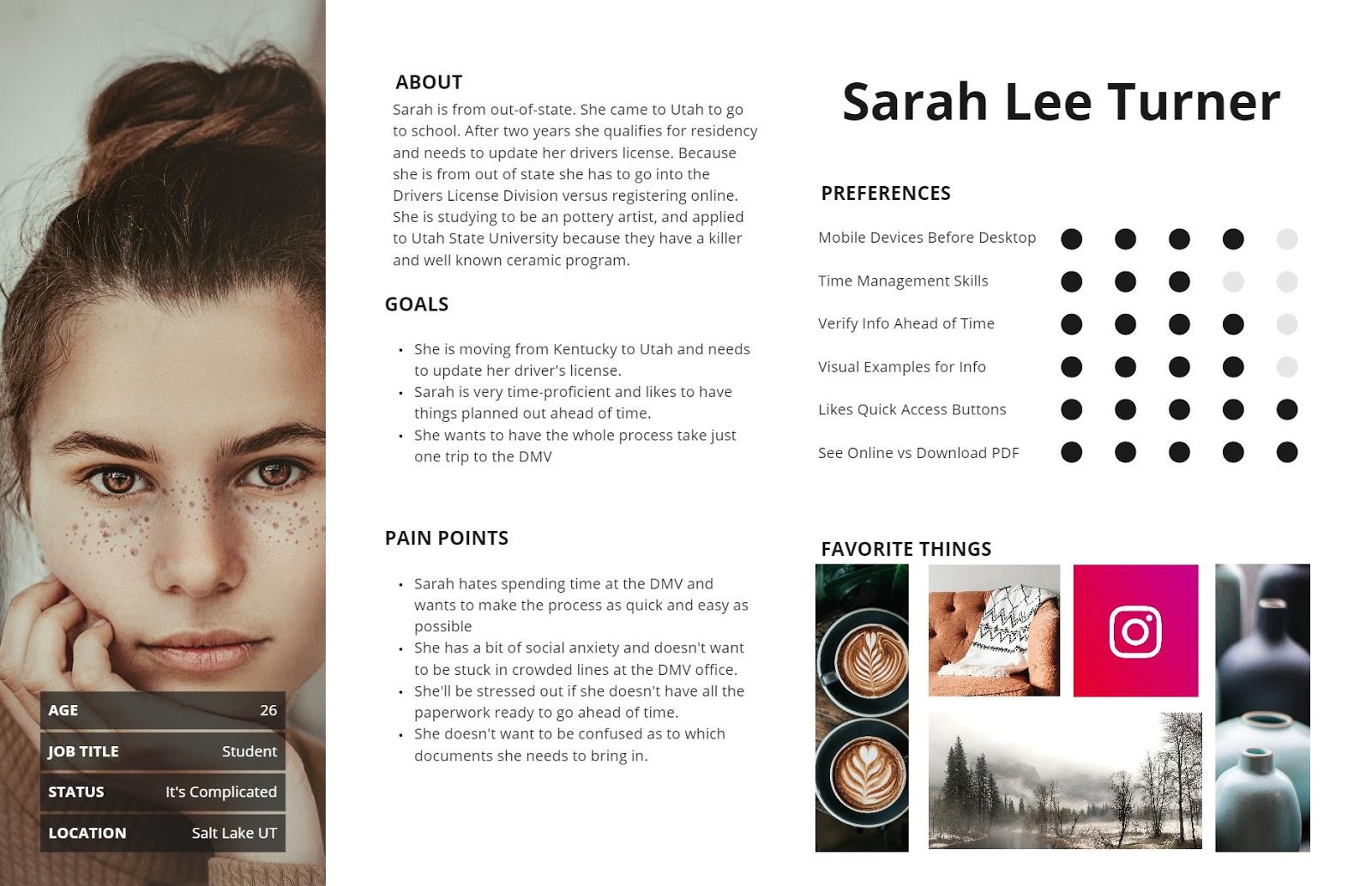
I created a proto-persona of someone who would be accessing the Drivers License Division website trying to find what kind of required documents they would need to bring.
Affinity Diagram
I decided to test some users on the current website design to see what their current likes and dislikes are. I then gathered what they said and turned it into an affinity diagram.
After I completed the affinity diagram I decided to measure the importance of the needs of the uses by putting them on a matrix. This way it would be easier to determine what would be the most beneficial thing to work on first when comparing the user and the stakeholders needs.
Users Liked
The navigation for the most part, minor issues, but usually easy to understand.
Users Hated
The content blocks and desired a cleaner look and for the content to be broken up.

Users Needed
To re-read the text to understand what they had read, or download a PDF to find info that should have already been there.
Heuristic Evaluation
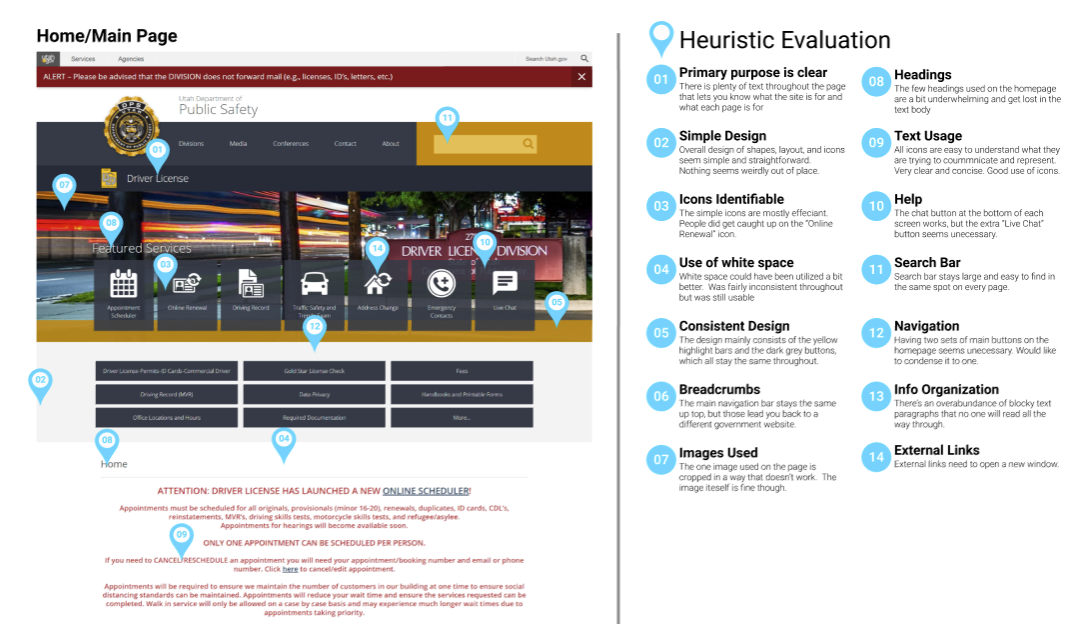
After testing the users on the current site I went through and determined issues on the site. This would help remind me visually of any issues users had when looking at the site. Then after I put on all the users' issues on the site I also added anything else that needed to be added, such as an color evaluation and some other usability issues.
Phase 2: Information Architecture
Redlining Navigation
mARKER 01
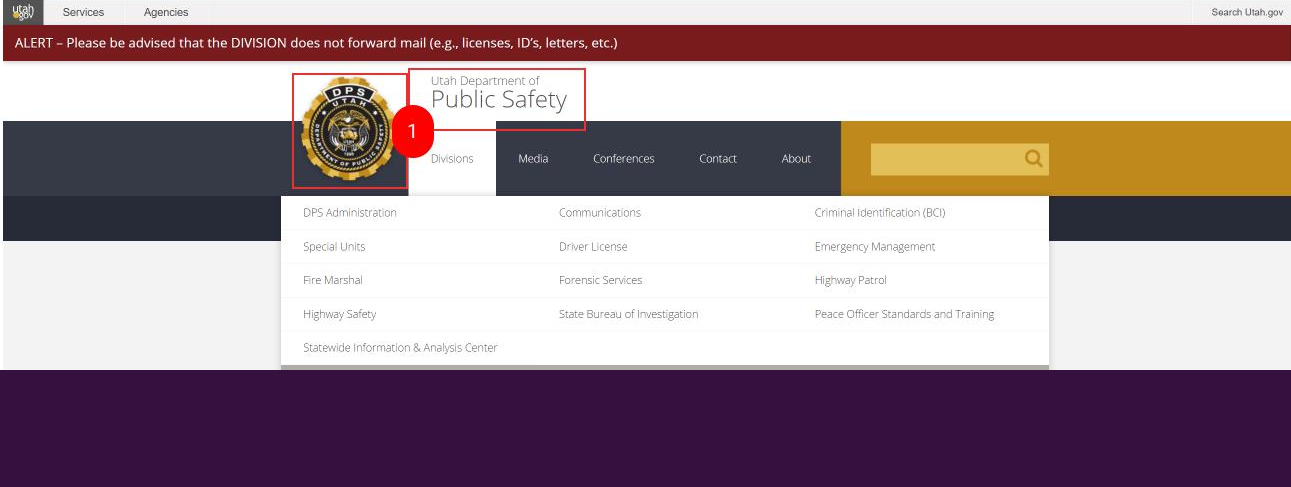
We believe that this section of the navigation needs to be fixed for a few reasons. One reason is that this site dld.utah.gov is part of a larger site. You can see in the domain name, that this is actually a subdomain. The interesting part is that this subdomain links out to other subdomains related to the Utah Department of Public Safety (all shown in the image above, in the “Divisions'' drop down). Clicking on either the logo or the “Utah Department of Public Safety'' will take you to publicsafety.utah.gov.
We wonder if making this less prominent, or even just taking off the logo/badge, users will no longer click on it to go back to their designated divisions main page when it really takes them to a different page entirely. Most users may not recognize they are on a subdomain of utah.gov so when they click on the badge they are trying to go back to their divisions page, but then they instead are surprised by the other home page. We both did this to other selves when looking at the stie, and we suspect users will too.
mARKER 02
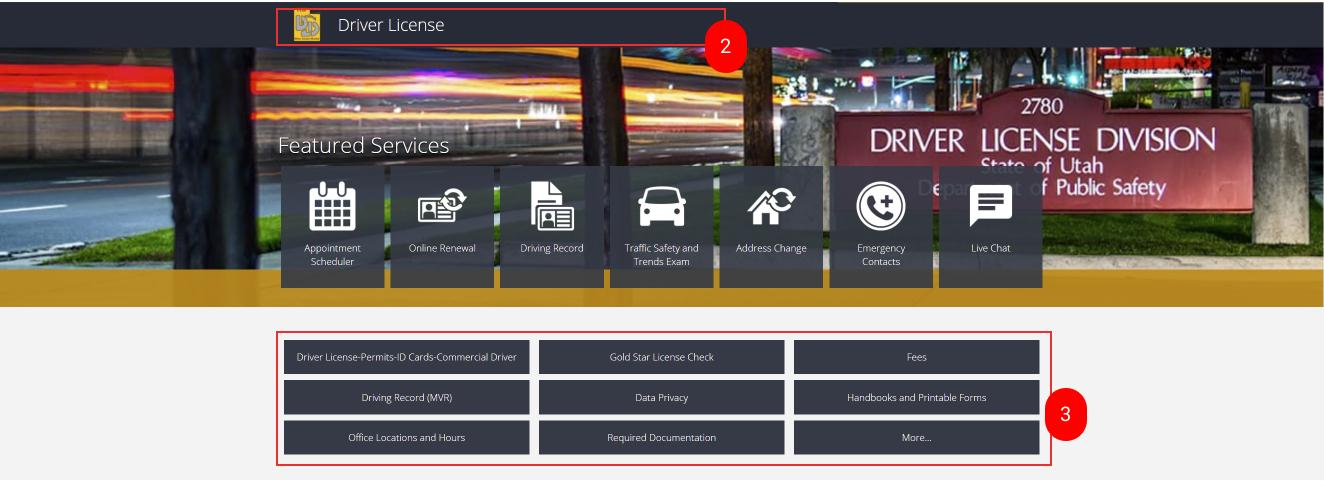
When clicking this marker you are taken back to the Drivers License Division main page. This is not very well seen, or understood at a glance. We wonder if making this more prominent, or turning it into a breadcrumb, will help users navigate around the site more easily and then they will know they are on a larger site. For example if instead it was dld.utah.gov, you are on the “required documents” page that appears to fall under drivers license, somehow. What if instead it had a breadcrumb that could say: Dept of Public Safety > Drivers License > Required Documentation. This way the user could then click on the different parts of the breadcrumb and navigate the site more fully and with clear logical steps.
mARKER 03
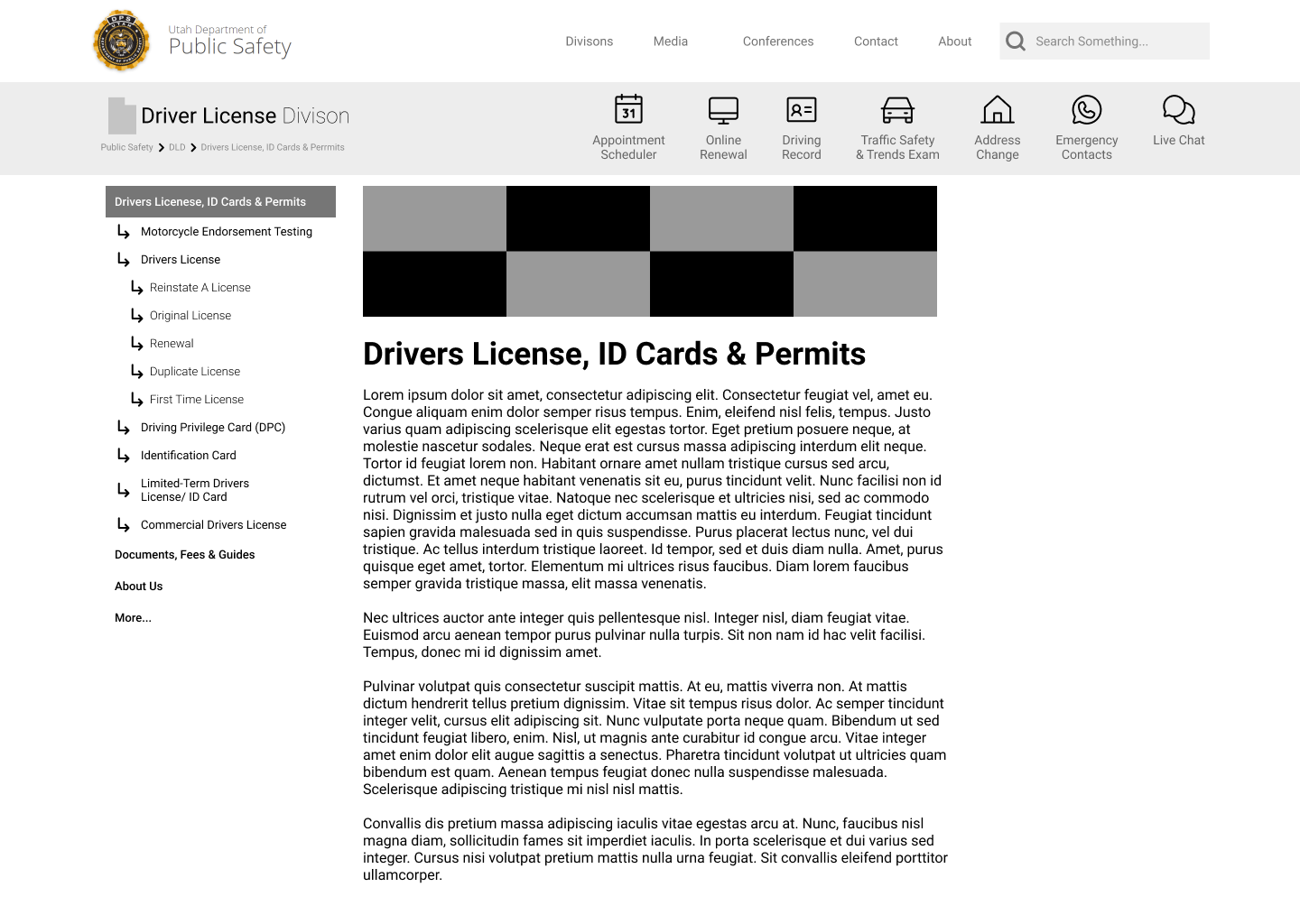
There are currently so many buttons to click on, plus a “More” button that brings up almost double the original buttons. The whole thing just seems cluttered and thrown together a bit. A better solution would be to organize these links in a sidebar with dropdown options to group things together in a way that makes sense and cleans up the navigation. This sidebar can then be added to every page to make navigation throughout the site much easier. It also clears up the clutter underneath the “Featured Services” and doesn’t detract from those buttons.
New Navigation
New Sitemap
Insights
Interaction Design
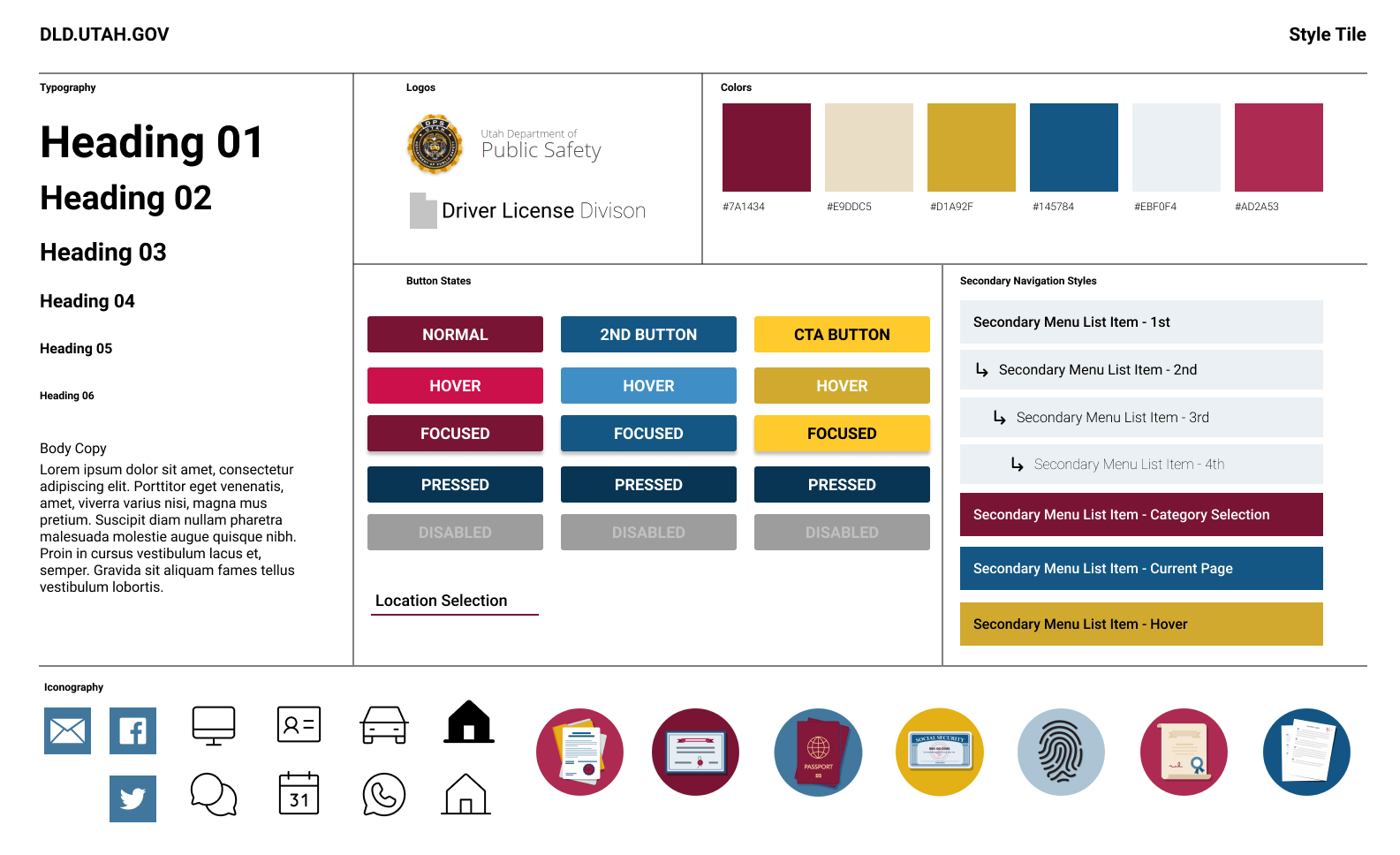
We wanted to keep the same branding for Utah’s government websites, but we wanted to make some things more clear and easier to understand. So we simpliied the navigation icons, and created some adiditonal icons for the article on how to renew your drivers license. These new icons for the process helps the user know what they need to do at a glance.
Conclusion
user Testing
During this project I wished that there were more people to user test. I eventually found a service that would kind of let you test more people, if you paid. I would love to try to use this feature more in the future. It was fun to use for the five second test, as well as getting heatmaps.
Next Steps
If I were to continue this project I would keep testing the navigation and making other pages for the site to validate that the navigation works because it would go to multiple different pages. Basically it would also allow me to test multiple user paths and see what would work better in the future.
Check out my other work!

UI Redesign: Utah DLD
Hypothetically, the dMV is great!
Everyone hates going to the DMV, let’s not make everyone mad by having to just go online to their site too! Redesigning these sites can be hard, but we believe we solved a lot of their issues. Now people won’t have to struggle before going to the DMV.
Scope
Qualitative user research, sitemapping,
Tools
Figma, Maze.co,
Timeline
2 months
Goverment websites need help
The Utah’s Drivers License Division has a website for users to go on and get information or change information for their own licenses. Most government websites don’t have the prettiest, or usable, user interface. This website is no different. It is not the worst site design we have seen but it definitely has some flaws.
Goals
- Understand the current website structure.
- Are there things we can condense and group together?
- Do some categories have higher importance than others? Are they structured as such?
- Understand our users?
- What are common uses with the site?
- What do the users plan to do on the site?
- Create a better expierence for renewing your drivers license.
Method
- Phase 1: User Analysis
- Phase 2: Information Architecture
- Phase 3: Prototyping
- Phase 4: Interaction Design
- Phase 5: User Testing
Phase 1: User Interface Analysis
methodology
In this project we wanted to interview five different people who would want to be able to look online to find what kind of documentation they would need to renew their driver’s licenses. Since this is a fairly standard procedure for just about everyone, we wanted to have a mixture of people that would have different types of ID documentation to bring in. ie citizens and non citizens. We wanted to analyze how easy it would be for everyone to find what they were looking for and make sure they were ready to go while heading into the DMV.
proto-persona
I created a proto-persona of someone who would be accessing the Drivers License Division website trying to find what kind of required documents they would need to bring.
Affinity Diagram
I decided to test some users on the current website design to see what their current likes and dislikes are. I then gathered what they said and turned it into an affinity diagram.
After I completed the affinity diagram I decided to measure the importance of the needs of the uses by putting them on a matrix. This way it would be easier to determine what would be the most beneficial thing to work on first when comparing the user and the stakeholders needs.
Users Liked
The navigation for the most part, minor issues, but usually easy to understand.
Users Hated
The content blocks and desired a cleaner look and for the content to be broken up.
Users Needed
To re-read the text to understand what they had read, or download a PDF to find info that should have already been there.
Heuristic Evaluation
After testing the users on the current site I went through and determined issues on the site. This would help remind me visually of any issues users had when looking at the site. Then after I put on all the users' issues on the site I also added anything else that needed to be added, such as an color evaluation and some other usability issues.
Phase 2: Information Architecture
Redlining Navigation
mARKER 01
We believe that this section of the navigation needs to be fixed for a few reasons. One reason is that this site dld.utah.gov is part of a larger site. You can see in the domain name, that this is actually a subdomain. The interesting part is that this subdomain links out to other subdomains related to the Utah Department of Public Safety (all shown in the image above, in the “Divisions'' drop down). Clicking on either the logo or the “Utah Department of Public Safety'' will take you to publicsafety.utah.gov.
We wonder if making this less prominent, or even just taking off the logo/badge, users will no longer click on it to go back to their designated divisions main page when it really takes them to a different page entirely. Most users may not recognize they are on a subdomain of utah.gov so when they click on the badge they are trying to go back to their divisions page, but then they instead are surprised by the other home page. We both did this to other selves when looking at the stie, and we suspect users will too.
mARKER 02
When clicking this marker you are taken back to the Drivers License Division main page. This is not very well seen, or understood at a glance. We wonder if making this more prominent, or turning it into a breadcrumb, will help users navigate around the site more easily and then they will know they are on a larger site. For example if instead it was dld.utah.gov, you are on the “required documents” page that appears to fall under drivers license, somehow. What if instead it had a breadcrumb that could say: Dept of Public Safety > Drivers License > Required Documentation. This way the user could then click on the different parts of the breadcrumb and navigate the site more fully and with clear logical steps.
mARKER 03
There are currently so many buttons to click on, plus a “More” button that brings up almost double the original buttons. The whole thing just seems cluttered and thrown together a bit. A better solution would be to organize these links in a sidebar with dropdown options to group things together in a way that makes sense and cleans up the navigation. This sidebar can then be added to every page to make navigation throughout the site much easier. It also clears up the clutter underneath the “Featured Services” and doesn’t detract from those buttons.
New Navigation
New Sitemap
Insights
Interaction Design
We wanted to keep the same branding for Utah’s government websites, but we wanted to make some things more clear and easier to understand. So we simpliied the navigation icons, and created some adiditonal icons for the article on how to renew your drivers license. These new icons for the process helps the user know what they need to do at a glance.
Conclusion
user Testing
During this project I wished that there were more people to user test. I eventually found a service that would kind of let you test more people, if you paid. I would love to try to use this feature more in the future. It was fun to use for the five second test, as well as getting heatmaps.
Next Steps
If I were to continue this project I would keep testing the navigation and making other pages for the site to validate that the navigation works because it would go to multiple different pages. Basically it would also allow me to test multiple user paths and see what would work better in the future.
Check out my other work!

UI Redesign: Utah DLD
Hypothetically, the dMV is great!
Everyone hates going to the DMV, let’s not make everyone mad by having to just go online to their site too! Redesigning these sites can be hard, but we believe we solved a lot of their issues. Now people won’t have to struggle before going to the DMV.
Scope
Qualitative user research, site mapping, user testing.
Tools
Figma, Maze.co,
Timeline
2 months
Government websites need help
The Utah’s Drivers License Division has a website for users to go on and get information or change information for their own licenses. Most government websites don’t have the prettiest, or usable, user interface. This website is no different. It is not the worst site design we have seen but it definitely has some flaws.
Goals
- Understand the current website structure.
- Are there things we can condense and group together?
- Do some categories have higher importance than others? Are they structured as such?
- Understand our users?
- What are common uses with the site?
- What do the users plan to do on the site?
- Create a better experience for renewing your drivers license.
Method
- Phase 1: User Analysis
- Phase 2: Information Architecture
- Phase 3: Prototyping
- Phase 4: Interaction Design
- Phase 5: User Testing
Phase 1: User Interface Analysis
methodology
In this project we wanted to interview five different people who would want to be able to look online to find what kind of documentation they would need to renew their driver’s licenses. Since this is a fairly standard procedure for just about everyone, we wanted to have a mixture of people that would have different types of ID documentation to bring in. ie citizens and non citizens. We wanted to analyze how easy it would be for everyone to find what they were looking for and make sure they were ready to go while heading into the DMV.
proto-persona
I created a proto-persona of someone who would be accessing the Drivers License Division website trying to find what kind of required documents they would need to bring.
Affinity Diagram
I decided to test some users on the current website design to see what their current likes and dislikes are. I then gathered what they said and turned it into an affinity diagram.
After I completed the affinity diagram I decided to measure the importance of the needs of the uses by putting them on a matrix. This way it would be easier to determine what would be the most beneficial thing to work on first when comparing the user and the stakeholders needs.
Users Liked
The navigation for the most part, minor issues, but usually easy to understand.
Users Hated
The content blocks and desired a cleaner look and for the content to be broken up.
Users Needed
To re-read the text to understand what they had read, or download a PDF to find info that should have already been there.
Heuristic Evaluation
After testing the users on the current site I went through and determined issues on the site. This would help remind me visually of any issues users had when looking at the site. Then after I put on all the users' issues on the site I also added anything else that needed to be added, such as an color evaluation and some other usability issues.
Phase 2: Information Architecture
Redlining Navigation
mARKER 01
We believe that this section of the navigation needs to be fixed for a few reasons. One reason is that this site dld.utah.gov is part of a larger site. You can see in the domain name, that this is actually a subdomain. The interesting part is that this subdomain links out to other subdomains related to the Utah Department of Public Safety (all shown in the image above, in the “Divisions'' drop down). Clicking on either the logo or the “Utah Department of Public Safety'' will take you to publicsafety.utah.gov.
We wonder if making this less prominent, or even just taking off the logo/badge, users will no longer click on it to go back to their designated divisions main page when it really takes them to a different page entirely. Most users may not recognize they are on a subdomain of utah.gov so when they click on the badge they are trying to go back to their divisions page, but then they instead are surprised by the other home page. We both did this to other selves when looking at the stie, and we suspect users will too.
mARKER 02
When clicking this marker you are taken back to the Drivers License Division main page. This is not very well seen, or understood at a glance. We wonder if making this more prominent, or turning it into a breadcrumb, will help users navigate around the site more easily and then they will know they are on a larger site. For example if instead it was dld.utah.gov, you are on the “required documents” page that appears to fall under drivers license, somehow. What if instead it had a breadcrumb that could say: Dept of Public Safety > Drivers License > Required Documentation. This way the user could then click on the different parts of the breadcrumb and navigate the site more fully and with clear logical steps.
mARKER 03
There are currently so many buttons to click on, plus a “More” button that brings up almost double the original buttons. The whole thing just seems cluttered and thrown together a bit. A better solution would be to organize these links in a sidebar with dropdown options to group things together in a way that makes sense and cleans up the navigation. This sidebar can then be added to every page to make navigation throughout the site much easier. It also clears up the clutter underneath the “Featured Services” and doesn’t detract from those buttons.
New Navigation
New Sitemap
Insights
Interaction Design
We wanted to keep the same branding for Utah’s government websites, but we wanted to make some things more clear and easier to understand. So we simpliied the navigation icons, and created some additional icons for the article on how to renew your drivers license. These new icons for the process helps the user know what they need to do at a glance.
Conclusion
user Testing
During this project I wished that there were more people to user test. I eventually found a service that would kind of let you test more people, if you paid. I would love to try to use this feature more in the future. It was fun to use for the five second test, as well as getting heatmaps.
Next Steps
If I were to continue this project I would keep testing the navigation and making other pages for the site to validate that the navigation works because it would go to multiple different pages. Basically it would also allow me to test multiple user paths and see what would work better in the future.
Check out my other work!